Category: Exchange 2013

Can I place my Exchange hybrid management server in Azure and use Azure Domain Services?

As some might know (although I and others have to repeat this regularly…), if you enable directory synchronization from your on-premises Active Directory (AD) and you migrate all you Exchange mailboxes to Exchange Online you still require an Exchange server to manage mail(box) objects. It is the only supported solution, even though some use third party tooling or ADSIedit. Luckily...

Cheat Sheet: Setting Exchange Mailbox User Permissions via PowerShell

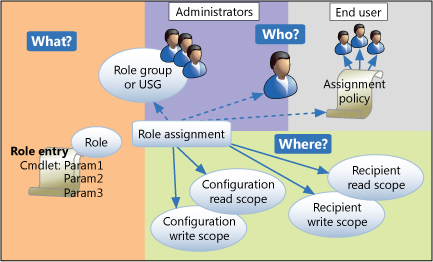
One of the things I get asked about quite a lot, is how you can set specific permissions in Exchange Server and Exchange Online. Most cases the Management Console (in 2010) or the Exchange Admin Center (EAC, Exchange 2013 & 2016 and Online) provide most basic permissions like Full Access, Send As and Send On Behalf. However, sometimes an admin...

Using your browser to check Exchange 2013 protocol health

Sometimes you’re not at work and you suspect there is something wrong with your Exchange 2013 servers and you can’t access your environment remotely for whatever reason. Well, in some cases you can check this with just a browser. For each Exchange protocol, there is an URL you can use to check the health. The format would be: https://<External FQDN>/<protocol>/healthcheck.htm If...

Issues with Unified Contact Store in combination with Lync on-premises and Exchange Online

I’ve encountered an issue that popped up while I was testing a move from Exchange On-premises to Exchange Online (EXO) while Lync Server 2013 remained on-premises due to Enterprise Voice. Outlook Web Access (OWA) from Exchange Online can be integrated with on-premises Lync, this way OWA users can see presence and have limited IM functionality just like what’s possible if...

No, Windows Phone ActiveSync is not on par with OWA for Devices

Recently I came across this Twitter exchange: @WayneHRiddle You don’t need it for WP. Native app handles all of that functionality. — Ben Rudolph (@BenThePCGuy) January 17, 2015 I’ve heard this argument before, that the Exchange ActiveSync (EAS) implementation in Windows Phone doesn’t require an OWA for Devices app (or MOWA as is the official acronym) like iOS has (for iPad...

Do not update your Office Web Apps Server with automatic updates

Although it is not exactly required to deploy with Exchange Server 2013, Office Web Apps Server (OWAS or also referred to as WAC server) provides a more user friendly experience instead of the standard Web Preview. For Lync Server 2013 it’s a requirement if you want to be able to present PowerPoint files in a conference. And well, for SharePoint...

Exchange 2013 CU7, Exchange 2010 SP3 RU8 and Exchange 2007 SP3 RU15 are out!

Update 12 december 2014: The fixed Exchange 2010 SP3 RU8 with v2 is now available. Same location as the plagued v1. Update 10 december 2014: Exchange Server 2010 SP3 RU8 has been pulled due to connectivity issues with Outlook. There is currently not ETA on the fix. Customers are advised to not install this RU8 or remove RU8 if they...

Mail enabled Public Folders on Exchange 2013 CU6 require action for internet mail to be received

So, CU6 is out. It’s easy to overlook the change mentioned within the Exchange 2013 Release Notes. And you might have missed the Exchange Team blog post about all Public Folder changes with CU6. And it might not be relevant for your situation. But I know certain customers rely on mail enabled Public Folders that are able to receive internet...

Released: Exchange 2013 CU6, Exchange 2010 SP3 RU7 and Exchange 2007 SP3 RU14

Today Microsoft released the 6th update to Exchange Server 2013, aptly named Cumulative Update 6 (CU6), the seventh update to Exchange Server 2010 SP3; Rollup Update 7 (RU7) and the 14th update to Exchange Server 2007 SP3 named Rollup Update 14 (RU14). They mostly contain smaller security fixes and/or bug fixes or DST (Daylight Saving Time) updates. Having said that,...

Legacy Public Folders to Exchange 2013 migration tips

A couple of weeks ago I performed a Public Folder migration from Exchange 2007 (aka legacy) towards the modern Public Folders of Exchange 2013. As you may know, the traditional migration method using Public Folder replica’s isn’t available due to a radical redesign of the Public Folder architecture. Instead of dedicated databases, the hierarchy and data are now stored in...

Office 365 users can’t see free/busy of on-premises users

The past few days I was working on making an on-prem Exchange Server 2013 SP1 environment hybrid with the Office 365 tenant. You would expect that running the Hybrid Configuration Wizard (HCW) would be it, after setting all the requirements as they should. Unfortunately after running the HCW, Office 365 mailboxes couldn’t access free/busy information of on-prem mailboxes. The other...

Disable Offline OWA in Exchange 2013

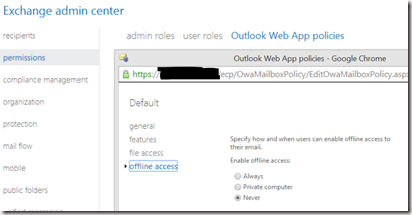
Although the Offline OWA functionality in Exchange 2013 is a great addition for those that cannot use Outlook (Anywhere with Cached Mode), but are frequently without internet. However, as the browser database in which Exchange OWA stores it’s information isn’t encrypted, it can be a security issue. It can be turned of via the Exchange Admin Center (EAC) via Permissions>Outlook...

Updated – Exchange 2013 DAG, Windows Server 2012 R2 and VMware vSphere? Check support!

UPDATED 28/3/2024: See update below article. A little heads up. While working on an extensive design including Exchange Server 2013 with Service Pack 1 installed on Windows Server 2012 R2, my eye caught a comment in the Facebook group Exchange Server 2013 (Facebook login required). VMwares vSphere 5.1 and higher are shown to be validated by Microsofts Server Virtualization Validation...